 Before you start the registration, it’s important to know what PIFRA is and how the system works today. PIFRA stands for Project to Improve Financial Reporting and Auditing, a reform project of the Government of Pakistan that later evolved into the Federal Accounting and Budgeting System (FABS) under the Controller General of Accounts (CGA). Through this system, government employees can receive monthly e-salary slips and pension slips directly by email, and their pay data is generated and managed through the official SAP-based financial system.
The official salary slip portal is now available at m.pifra.gov.pk (mobile-friendly) and through related FABS/AGPR services where employees can also see bill status, vendor information, DDO BER, and other financial reports.
In this updated guide, you’ll learn:
- What PIFRA/FABS is and who can use it
- Latest requirements for salary slip registration
- Step-by-step email registration on the official portal
- How monthly salary slips are delivered in 2026
- Extra tools like bill status, DDO BER, vendor info
- Common problems and simple troubleshooting tips
This way, whether you are a teacher, doctor, clerk, police official, or pensioner, you can handle your payroll matters from your mobile or computer without repeatedly visiting the accounts office.
What Is PIFRA / FABS and Why Your Salary Slip Now Comes by Email?
PIFRA started as a World Bank–supported reform project to improve financial reporting and auditing in Pakistan’s government departments. Later, the system was integrated into FABS (Federal Accounting and Budgeting System), which is the core IT backbone under the CGA for managing government accounts, budgets, payments, and payroll.
Today, PIFRA/FABS offers:
- E-Salary Slips – Monthly salary slips emailed to registered employees.
- Pension Slips – E-slips for retired government servants.
- Bill Status – Online status of submitted bills.
- DDO BER Reports – Budget execution and expenditure reports for Drawing & Disbursing Officers (DDOs).
- Vendor Information – Payment tracking for vendors/contractors working with government departments.
All this runs on a SAP-based ERP system, which securely stores and processes payroll and budget data for federal and provincial governments. Your salary slip is generated in this SAP system and then pushed to your registered email every month through the PIFRA/FABS servers.
Who Can Use PIFRA Salary Slip Service?
The PIFRA salary slip service is for Sarkari Mulazmin (Govt job holders) who are paid through the government’s official accounting system. This includes:
- Teachers and education staff (schools, colleges, universities)
- Doctors, nurses, paramedics in government hospitals
- Secretariat, office and field staff in all departments
- Police, civil armed forces and other uniformed departments (where integrated)
- Provincial and federal employees in Punjab, Sindh, KP, Balochistan, GB, AJK
- Retired employees receiving pensions through AGPR or provincial AGs
If your salary is processed through government treasury/AG/AGPR and you have an Employee Personnel Number, you are generally eligible to register.
Information You Need Before Registration
Before opening the registration page, keep these details in your hand. Most of the latest PIFRA guides and official pages also mention these same requirements:
- You must be a Government employee (or pensioner)
- Employee Personnel Number / Employee ID
- Province / Government code (see table below)
- Updated CNIC Number (without dashes)
- Date of Birth (as per CNIC/service record)
- Mobile Number registered in your own name
- Active Email ID – preferably Gmail (Yahoo is also commonly used)
- Pay Scale/BPS (used in some forms and for identification)
- Complete Name (as written on CNIC and service record)
If any of this information is wrong or mismatched in the system, your registration may fail or your slips may not arrive.
Latest PIFRA / FABS Government Codes for Registration
While filling the PIFRA salary slip registration form, you must select the correct Government Code. These codes are still used on the official and latest salary slip guides:
| Government Code | Province / Government |
|---|---|
| F | Federal Government |
| P | Punjab Government |
| S | Sindh Government |
| N | Khyber Pakhtunkhwa (KP) Government |
| B | Balochistan Government |
| DGP | District Government Punjab |
| DGN | District Government KP |
| K | Kashmir (AJK) |
| GB | Gilgit-Baltistan |
| GBC | GB Council |
| C | Kashmir Council |
Make sure you choose the right government code according to your posting; otherwise, the system will not match your personnel record.
PIFRA Salary Slip Email Registration Step-by-Step (2026 Update)
Now let’s move to the main part: how to register for PIFRA salary slip online so your salary for Feburay 2026 and onward comes directly to your email.
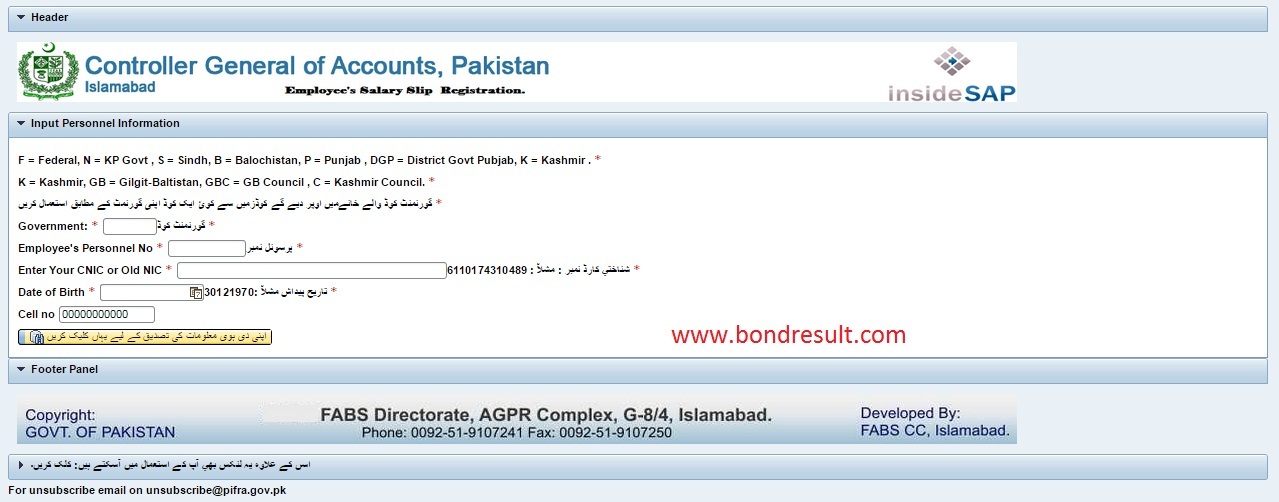
Step 1 – Open the Official Salary Slip Portal
- Open your browser (Chrome, Edge, Firefox, mobile browser).
- Go to the official salary slip registration page:
m.pifra.gov.pk/salaryslip_emp or via m.pifra.gov.pk and choose the salary slip option.
A registration form will appear on your screen.
Step 2 – Fill the Registration Form Carefully
On the registration form, enter the following details exactly as per your office record:
- Government Code – choose from the table above (P, F, N, S, B, DGP, DGN, K, GB, GBC, C).
- Employee Personnel Number – you can find it from your previous pay slip or from your department accountant / District Accounts Office.
- CNIC Number – write it without dashes (e.g., 3120312345678).
- Date of Birth – select from the date picker.
- Mobile Number – your own SIM, active and switched on.
Double-check all fields before moving ahead.
Then click on the button that verifies your information (on the official Urdu portal this is usually written as:
“اپنی دی ہوئی معلومات کی تصدیق کے لیے یہاں کلک کریں۔”).
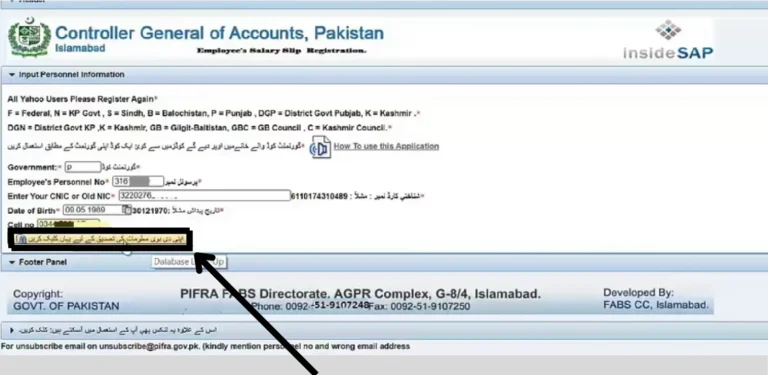
If your data matches the government HR/payroll record, you will see a success message.
Step 3 – Enter and Confirm Your Email Address
After initial verification, the system will ask you to provide your Email Address.
- Type your Gmail (recommended) or Yahoo email ID.
- Re-type it to confirm there is no spelling mistake.
- Submit the form.
In many of the latest guides, after this step you may receive either:
- A confirmation email with a verification link, or
- An OTP (one-time password) sent to your email or mobile which you must enter on the portal.
Complete this email authentication step to activate your e-slip service.
Step 4 – Wait for Confirmation and First Salary Slip
Once all steps are completed and your email is verified, your registration is considered successful. Usually, you will:
- Receive a confirmation message on the portal
- Start receiving monthly salary slips in your email inbox (often from “noreply” or official CGA/FABS mail server) from the next salary cycle
Sometimes, if you register mid-month, your first slip may come from the next month onwards.
How Monthly PIFRA Salary Slips 2026 Are Delivered
Now the old system of physically collecting salary slips from the accounts office is almost fully replaced by e-slips in most federal and provincial departments. After successful registration:
- Your salary slip is generated in the SAP/FABS system.
- A PDF copy is sent to your registered email every month.
- You can download, save, or print the PDF whenever needed.
- The slip includes your basic pay, allowances, deductions, net pay, bank details, and departmental information.
These e-slips are commonly accepted for:
- Bank account opening and KYC
- Loan and credit card applications
- Visa and embassy requirements
- Service record and personal file
If you are a pensioner, a similar process is used for pension slips via AGPR or relevant provincial AG office.
Extra Online Services: Bill Status, DDO BER, Vendor Info
Along with salary slips, PIFRA/FABS has introduced several other useful tools which many employees still don’t fully use:
- Bill Status – Check if your department’s bills are approved, under process, or returned.
- DDO BER (Budget Execution Report) – For DDOs to see monthly expenditure and budget status.
- Vendor Information – For contractors and vendors to check their payment status through CNIC/NTN.
- Email Registration Pages (AGPR/AG offices) – Some AG offices also provide direct email registration pages for salary and pension slips.
These tools make the whole financial side more transparent for both employees and departments.
Common Problems in PIFRA Registration with Simple Fixes
Even though the registration is simple, a few common issues keep coming up in 2026. Here are the main problems and solutions collected from recent guides and official notes.
1. “Information not matching” or form not accepting data
Reason:
- Wrong government code
- Incorrect employee personnel number
- CNIC or DOB not matching HR record
Fix:
- Confirm your personnel number from your last pay slip or accounts office.
- Make sure your CNIC and date of birth are exactly the same as in your service record.
- Re-check your government code (P, F, N, S, etc.) according to your posting.
2. Not receiving email / salary slip in inbox
Reason:
- Email typed with a spelling mistake
- Email provider blocking or marking as spam
- Slip is still under processing for the current month
Fix:
- Check Spam/Junk folder in Gmail/Yahoo.
- Add the sending address to your Contacts / Safe Sender list.
- If you registered very recently, wait for the next month’s slip.
- If still not received for multiple months, contact your accounts office or the relevant AG/AGPR helpline shown on their site.
3. Want to change or unsubscribe email
Sometimes employees change their email or want to stop receiving slips at a particular address.
- For unsubscribing, the official PIFRA site mentions an email for unsubscribe requests (commonly something like
unsubscribe@pifra.gov.pk). - For changing email, you may need to re-register with the new email or contact your accounts/AGPR support with proper application and ID.
Always follow the latest instructions on the official AGPR/FABS/PIFRA site because procedures can be updated.
4. Portal not opening / site error
Fix:
- Try another browser (Chrome, Edge, Firefox) or use mobile data instead of office Wi-Fi (sometimes government firewalls block the site).
- Use the exact address: m.pifra.gov.pk and not mistyped versions like “pefra” or other spellings.
- Check if the site is temporarily under maintenance and try after some time.
PIFRA Video Tutorial
If you prefer a video tutorial, there are several updated videos on YouTube that show the latest process for PIFRA salary slip and pension slip email registration step by step (screen recording of the actual portal).
You can embed your own official or recommended video at the end of this article (like you did in the old post) so that users can read the steps and then watch the process visually.
So How to Get Your Salary Slips From Your Inbox
In the past, government employees had to stand in queues at the accounts office just to get one salary slip. Now, with PIFRA + FABS + AGPR online email registration, you can:
- Register once and receive salary slips every month in your email
- Download and print your slips anytime, from anywhere
- Track department bills, budgets and vendor payments through related portals
- Reduce paperwork, save time, and keep all your financial records safe in digital form
If you are a government employee and still not yet registered, this is the right time to complete your PIFRA Salary Slip online registration so your January 2026 and future salary slips reach your Gmail inbox without any tension.
Frequently Asked Questions (FAQs)
What is a PIFRA salary slip?
A PIFRA salary slip is an official online pay slip issued to government employees in Pakistan. It shows monthly salary details including basic pay, allowances, deductions, and net salary. The slip is generated through the PIFRA system and is used for record keeping, loan applications, and official verification.
How can I check my PIFRA salary slip online?
You can check your PIFRA salary slip online by visiting the official PIFRA salary slip portal. Enter your CNIC number (without dashes), select your employment type, and submit the form. After verification, your salary slip is displayed or emailed to you.
What details are required to get a PIFRA salary slip?
To get your PIFRA salary slip, you need your 13-digit CNIC number without spaces or dashes. In some cases, you may also need your employee type and department information for proper verification.
Can I download my PIFRA salary slip in PDF format?
Yes, once your salary slip appears on the screen, you can download it in PDF format. This PDF can be saved, printed, or shared for official use such as bank verification or personal records.
What should I do if my PIFRA salary slip does not appear?
If your salary slip does not appear, first double-check your CNIC number. If the issue continues, it may be due to incomplete department records or email registration issues. In such cases, contact your department’s accounts office to ensure your details are correctly updated in the PIFRA system.
Is PIFRA salary slip available for pensioners?
Yes, pensioners can also access their PIFRA pension slips online using their CNIC number. The process is similar to checking a salary slip and provides details of monthly pension payments and deductions.
Is the PIFRA salary slip system safe to use?
Yes, the PIFRA salary slip system is an official government platform and is considered secure. However, you should always access it from the official website and avoid sharing your CNIC details with unauthorized sources.


I am Fahad Munir, an experienced finance and prize bond analyst, provides reliable, up-to-date results, expert tips, and insights at BondResult.com to enhance your prize bond strategies