 Have you ever received a strange call and thought, “Yeh number kis ke naam par hai?” Or maybe you wanted to know how many SIMs are active on your CNIC before buying a new SIM card. In Pakistan, this is now a very common concern. Many people only discover unknown SIMs on their ID card after a fraud call, banking issue, or PTA verification problem.
That’s why CNIC SIM Check has become important for almost every mobile user in Pakistan. Whether you use Jazz, Zong, Ufone, or Telenor, you should regularly check how many SIMs are registered against your CNIC. It only takes a few minutes and can help protect your identity.
The good thing is that Pakistan Telecommunication Authority (PTA) already provides official methods for checking SIM ownership and registered numbers. You can use SMS service 668 or the official SIM Information System portal.
I’m Fahad Munir, and on BondResult.com, I always try to explain things in simple Pakistani-style English so everyone can understand easily — whether you are a student, shopkeeper, office worker, or someone helping parents with mobile registration.
What Is CNIC SIM Check?
CNIC SIM Check means checking how many mobile SIM cards are registered against your Pakistani CNIC number. Your CNIC is your Computerized National Identity Card issued by NADRA.
Whenever you buy a new SIM in Pakistan, biometric verification is required. That SIM then becomes linked with your CNIC. Over time, many people forget how many numbers they have used. Some even lose old SIMs without blocking them.
This creates problems because:
- Unknown people may misuse your SIM
- Fraud calls can be linked to your CNIC
- Banking OTPs may go to inactive numbers
- PTA may block extra or suspicious SIMs
That’s why checking your SIM record every few months is a smart habit.
How to Check SIMs Number on CNIC?
There are two official methods in Pakistan.
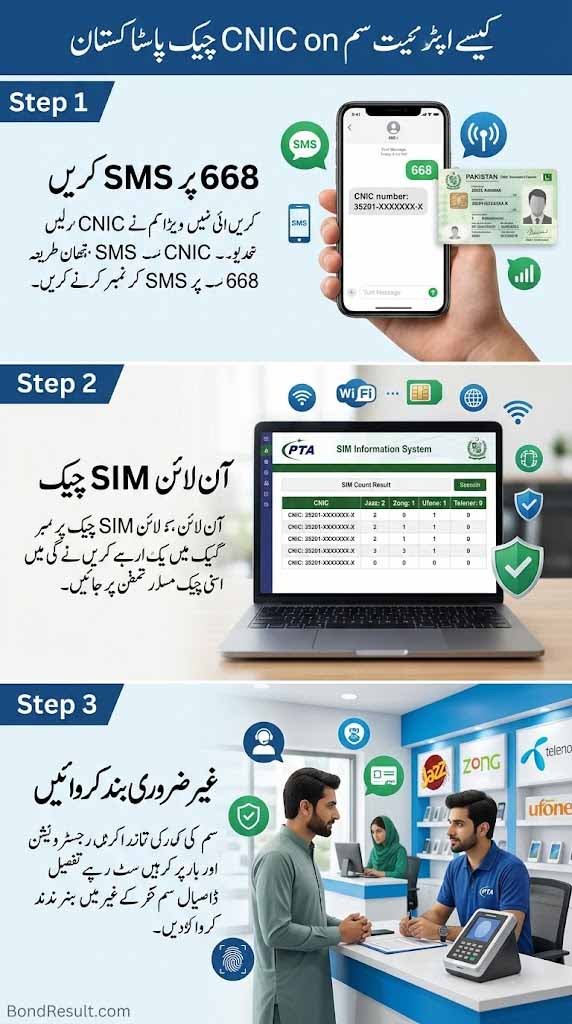
Method 1 – Check SIMs Through SMS 668
This is the easiest method for most people.
Steps:
- Open your mobile SMS app
- Type your 13-digit CNIC number without dashes
- Send it to 668
- Wait for reply from PTA
You will receive details showing how many SIMs are active on each network like:
- Jazz
- Zong
- Ufone
- Telenor
PTA officially confirms this method on its website.
For example, if you receive:
- Jazz: 2
- Zong: 1
- Ufone: 0
- Telenor: 1
It means 4 SIMs are registered on your CNIC.
Many people in Pakistan use this method before applying for banking apps, Easypaisa, JazzCash, or government schemes because mobile verification has become very important now.
Method 2 – Online Check SIM Number Through CNIC Pakistan
If you want more details, use the official PTA SIM Information System.
Official Website
This system is operated under PTA guidance.
Steps to Use Online CNIC SIM Check
- Open the website
- Enter your CNIC number
- Complete captcha verification
- Click Submit
You will then see:
| Mobile Network | Total SIMs |
|---|---|
| Jazz | Active Numbers |
| Zong | Active Numbers |
| Ufone | Active Numbers |
| Telenor | Active Numbers |
This method is helpful because it shows network-wise details clearly.
Sometimes people are shocked to see extra SIMs they never used. If that happens, visit the nearest franchise immediately.
How Many SIMs Are Allowed on One CNIC?
According to PTA rules, one Pakistani CNIC can have a limited number of SIMs registered. PTA FAQs mention SIM limits and registration controls.
Many users search:
“How many SIMs are in my ID card in Pakistan?”
The answer depends on PTA’s current telecom policy, but users should avoid unnecessary SIM registrations.
If you already have multiple unused numbers, it is better to block them.
Is CNIC an ID Card?
Yes. CNIC stands for Computerized National Identity Card.
It is issued by NADRA and works as the official identity document for Pakistani citizens.
Your CNIC is required for:
- SIM registration
- Bank accounts
- Passport applications
- Government schemes
- Mobile wallets
- Utility services
That’s why protecting your CNIC information is extremely important.
Can You Check SIM Owner Details by Number?
Many people search:
- check sim owner details by number
- sim number to cnic details
- check sim details by number
Here’s what matters.
In Pakistan, full SIM owner details are not publicly available because of privacy and PTA regulations. You cannot legally see another person’s CNIC complete details online.
However, you can:
- Check SIMs registered on your own CNIC
- Verify your own numbers
- Contact mobile company support if needed
- Report suspicious numbers to PTA
Avoid fake websites claiming:
- “Full SIM database”
- “Live tracker”
- “SIM owner name finder”
Most of these are unsafe or illegal.
What to Do If Unknown SIM Appears on Your CNIC?
This situation happens more often than people think.
Imagine you check your CNIC SIM record and suddenly see:
- 2 unknown Jazz numbers
- 1 extra Zong SIM
Naturally, panic ho jati hai.
But don’t worry. Here’s what you should do:
Immediate Steps
Visit Franchise
Go to:
- Jazz franchise
- Zong customer center
- Ufone franchise
- Telenor office
Take:
- Original CNIC
- Mobile phone
- SIM ownership complaint
Request SIM Block
Ask them to:
- Block unauthorized SIMs
- Remove inactive numbers
- Update biometric verification
File PTA Complaint
Use PTA complaint system if issue continues.
This is important because criminals sometimes misuse stolen CNIC data.
Why Regular CNIC SIM Check Is Important
Many Pakistanis ignore this until a problem happens.
But today, almost everything is connected with your mobile number:
- Bank verification
- WhatsApp account
- Easypaisa
- JazzCash
- BISP verification
- Government portals
Even one unknown SIM can create serious trouble.
That’s why experts recommend checking your SIM record every few months.
Especially if:
- You lost your phone before
- You changed networks many times
- You bought SIMs years ago
- Someone else used your CNIC copy
PTA SIM Verification System Explained
PTA launched the SIM Information System to help Pakistani users protect themselves from misuse and illegal registrations.
The system helps users:
- Check SIM count
- Verify ownership
- Report suspicious registrations
- Improve telecom security
This became more important after concerns about misuse of mobile numbers in scams and fraud cases.
Common Problems During SIM Check
Sometimes users face issues like:
Website Not Opening
This usually happens during peak hours.
Try:
- Different browser
- Mobile data instead of Wi-Fi
- Refresh after some time
SMS 668 Not Working
Possible reasons:
- Balance issue
- Wrong CNIC format
- Network delay
Always type CNIC without dashes.
Correct example:
3520212345671
Wrong example:
35202-1234567-1
Captcha Error
Refresh the page and enter captcha carefully.
Difference Between SIM Count and SIM Owner Check
People often confuse these two things.
| Feature | Available Publicly? |
|---|---|
| SIM count on your CNIC | Yes |
| Your own SIM verification | Yes |
| Other person’s CNIC details | No |
| Other person’s complete SIM ownership | No |
So if someone searches:
- sim owner details online check by cnic pakistan
- check sim owner details by number
They should know that official systems mainly support personal verification only.
Helpful PTA Codes for Pakistani Users
Here are some useful services.
| Service | Code |
|---|---|
| SIM Count Check | 668 |
| Jazz Verification | 6001 |
| Ufone Verification | *336# |
| Zong Verification | Send V to 7911 |
PTA also explains different network verification methods officially.
Safety Tips for Mobile Users in Pakistan
Let me share something practical.
Many people give CNIC photocopies casually at shops, franchises, or online forms without thinking much. Later, unauthorized SIMs appear under their name.
To stay safe:
- Never share CNIC photo publicly
- Don’t upload ID card on random websites
- Block lost SIMs immediately
- Use biometric verification carefully
- Check SIM count every few months
A small habit can save you from a big problem later.
Final Words About CNIC SIM Check
If you use a mobile phone in Pakistan, doing a CNIC SIM Check is no longer optional. It is one of the simplest ways to protect your identity and avoid future issues.
Whether you want to:
- check SIM number on my CNIC
- do online check sim number through cnic pakistan
- verify unknown numbers
- remove unauthorized SIMs
Always use official PTA methods only.
The safest and most trusted option is the PTA SIM Information System and 668 SMS service.
Many Pakistani users now regularly check their SIM records before applying for bank accounts, government schemes, or new mobile services. A quick check today can save you from stress tomorrow.


I am Fahad Munir, an experienced finance and prize bond analyst, provides reliable, up-to-date results, expert tips, and insights at BondResult.com to enhance your prize bond strategies